PIDs, FMHEs, Fans, and Intercooler Pump Flow Rates

I have a variety of topics today, but maybe they will all come together in the end.  If not, at least they will help me progress my thinking.

PIDS

The Society of Automotive Engineers (SAE) established a number of standard parameter identifiers (PIDs) so that as on-board diagnostics matured (OBDII) there would be  standard way to interface with an automobile and determine current status, parameters, etc.  Unfortunately, today the majority of PIDs in use by manufacturers are non-standard PIDs.  Further, instead of publishing the list of non-standard PIDs in use, the manufacturers sell their list to diagnostic equipment manufacturers.  That leaves small businesses out of the picture since they can’t afford to purchase the rights to the annual PID lists from multiple manufacturers.

I have been using the Harrison R&D CanScan interface and software to datalog the STS-V.  I need to monitor the intake air temperature sensor after the intercooler, IAT2, which unfortunately is a non-standard PID, and the software doesn’t have the hexidecimal code for that one.  HPTuners has done a lot of GM work with their scanning and tuning solutions.  I ordered a HPTuners VCM Scanner setup to use for datalogging.  It can be upgraded later to the full tuning suite if needed.

Once I can monitor the IAT2 temps then I can get more detailed logs of how my stock intercooler cooling system performs before considering any changes.

FMHE

Front mounted heat exchangers:  the popular under-bumper heat exchanger is a 26″ wide x 7″ tall x 3.5″ deep water to air heat exchanger that fits under the nose of the STS-V.  Scanning google it is also a popular add to other supercharged cars.  First, it retails for $179 which makes it affordable.  Second, it fits in a variety of applications.  Here is a link to the one at frozonboost.com:

FrozenBoost.com FMHE
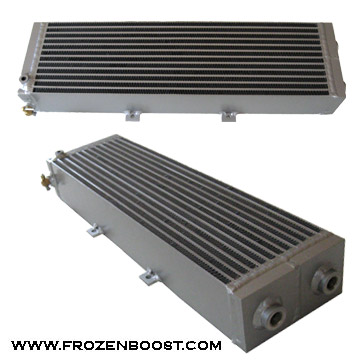
Very little data on how efficient it is, but I have read a number of happy reports with good results.  Also, this one has been used in some current STS-V installations with good results.

Fans

One of my favorite FMHE solutions is the one at revanracing.com, which has dual puller fans behind a heat exchanger.  It is 26x12x4.5 (29″ wide with side mounts). Unfortunately although the width looks good the height is a bit tall for the STS-V nose where only 8″ is available.  I would like to add 2 puller fans to the 7″ tall FMHE but I am not sure there is room yet.  More study needed.

Pump Flow Rates

Another topic for discussion in intercooler cooling modifications is the flow rate for the intercooler pump.  The stock bosch-sourced intercooler pump on the STS-V is a centrifugal unit and flows 8 gallons per minute (gpm) or similar.  Some replacements claim flow rates of up to 30 gpm, which apparently can move the fluid through the core too fast to effectively remove heat.   This is something that would need more inputs for study — like temperature sensors at the in/out of the laminova intercooler system, and in/out of the heat exchanger and tests with datalogs in a variety of conditions.  I think for now I will leave this topic for later, and let others experiment in this area.  One of the features however of the 7″ FMHE is it has an easy place to put a temperature sensor.

On a separate note, at steady state driving the temperature change across a radiator is often only 10F.   The issue is how well the FMHE handles temperature transits such as wide open throttle induced sudden supercharger heat.

Summary

I am having a great time analyzing / studying the various engineering issues around intercooler cooling, and the body of work that people have done to test and install improved cooling solutions on their vehicles.  I think the important thing is to review it all, then setup an appropriate experiment and test, test, test.  That way we will have persuasive data on what works and what just costs money.  It is not lost on me that all of the changes people are making may make very little difference in the real world.  So my plan in general is consider, research, design an experiment, test the stock setup, select a mod, mod, test the mod.  Hopefully that will yield persuasive data, and along the way make for interesting articles here on the blog.
 

Datalogging the Cadillac STS-V – CANScan

This could be subtitled, datalogging for dummies.  Today was a regular sort of everything-is-complicated project day.

I wanted to get some datalogs on my 2008 Cadillac STS-V to start to study & understand how it reacts to intake air, temperature, etc.  In order to do that I needed to grab my netbook, my CanScan to connect the netbook to the Cadillac, and maybe a camera, and we’re off!

Well, no.  First I had to spend an hour looking for my netbook, a Dell Mini 9, which I seldom use.  This also makes it perfect for the datalogging project, but means that I spent the first hour finding the netbook, and then there was a delay while getting it recharged and able to operate on battery, researching why the battery was not charging properly, etc.

Luckily while I looked for my netbook I found the CanScan USB in the garage, by Harrison R&D.  The CanScan is a USB to CAN bus interface module.  The Cadillac speaks CAN bus, so with this interface module my netbook, once I found it, using the appropriate software, also from Harrison R&D, could speak to the Cadillac.  I also had not used the CanScan in years but luckily it was on the tool shelves.

In between I found my Flip video camera and worked on getting it charged.  For naught as it turned out, as I didn’t actually take any pics, and by the end realized that my model does not charge on the USB port, but rather takes disposable AA batteries.  Oh good.

Anyway, with the netbook and the software and the interface and the flip camera with new batteries and in the STS-V and remembering how to get it all to play together,  I was able to capture this datalog of a drive around the block:

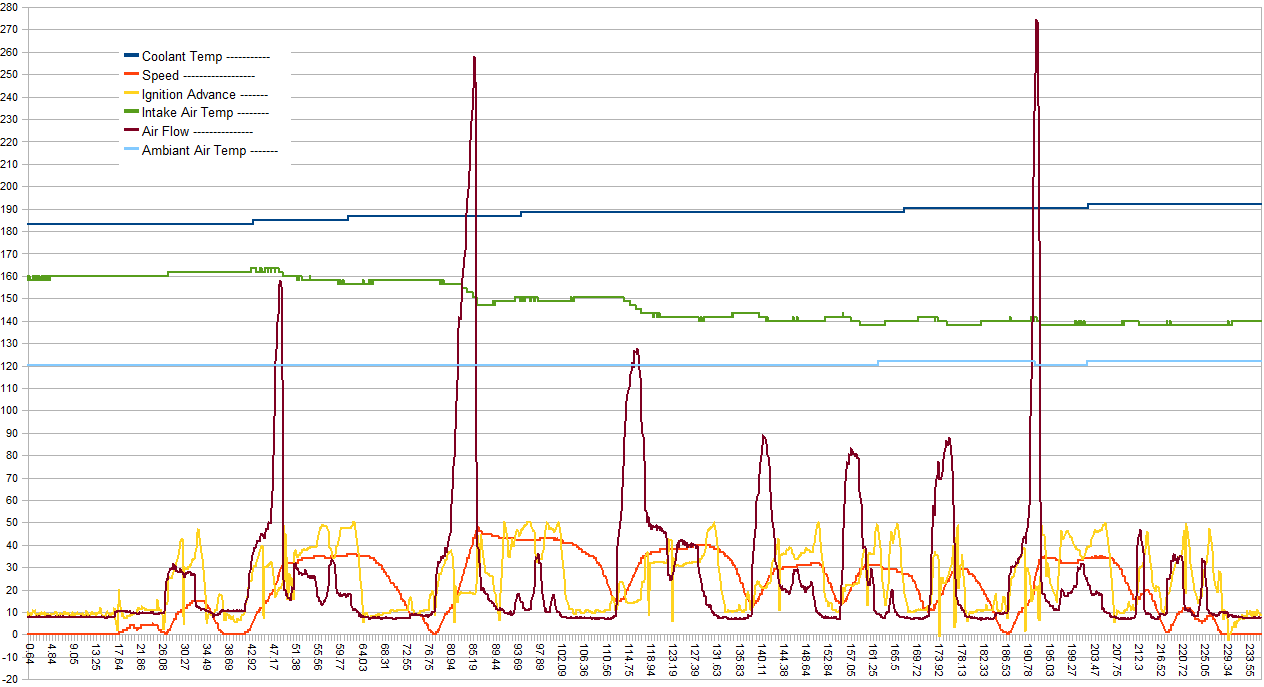
Click the graph to open a larger version; perhaps right-click and put it in another tab or window then come back.  I’ll wait.

The datalog shows coolant temperature, vehicle speed, ignition advance, intake air temp, air flow, and ambient air temp over time (the y axis is shared, the x axis is time).

The brown spikes are heavy throttle application causing high air flow.  The Red is vehicle speed, which goes up with the high throttle angles.  The yellow squiggle is advance as the PCM juggles timing.

The Green line at the top, Intake Temp, and the light blue line, ambient air temp, are of interest. The darker blue at the very top is the radiator coolant temp, which is less interesting today.  I was not able to find something called Intake Temp 2, which perhaps would be the air after the supercharger.  Ambient air is perhaps the outside air, and Intake Temp is the air entering the supercharger.  So with the temp here around 95F and the Cadillac in the driveway, the hood is hot, the engine is hot, and starting my drive the Intake temp was 160F and decreased slowly as the relatively cooler air of the drive flowed over the engine compartment.  The Ambient Temp was 120F, remaining near there throughout the drive.

I am tempted to think the value shown as IAT is IAT2, since even with heat soak it is hard to think the car would be at 160F at the intake to the Supercharger, but hopefully I can find the right info to ask the gadget to send the IAT2 temperature as well in my next test.

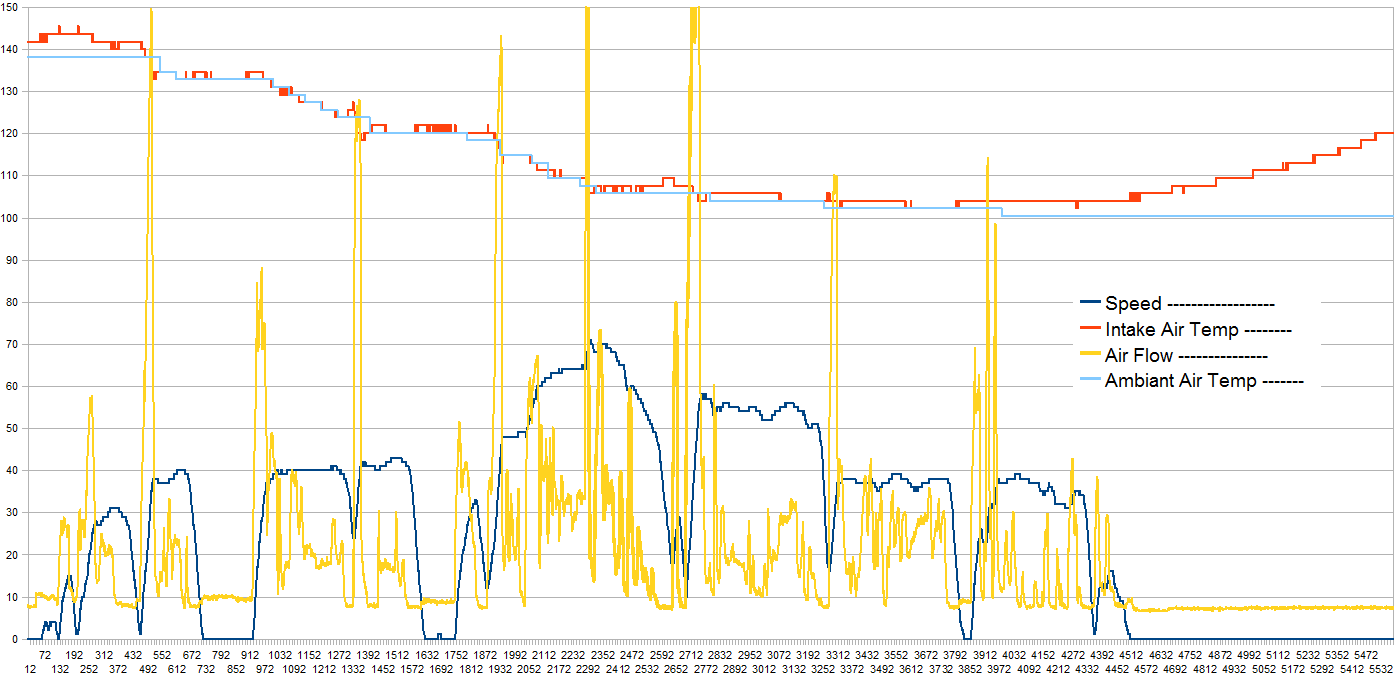
Here is a comparative (and also too crowded) datalog showing IAT falling to near ambient temp when on the highway, then zooming up when in traffic.

Datalog of a run up and down the Highway, then stop for Icecream and stuck in traffic

Cadillac STS-V First PerformanceBox Test

I have a RaceLogic PerformanceBox which can be used to measure vehicle performance in a variety of tests.  The Performancebox is a GPS based meter and data logger.

Unfortunately, I don’t get to use it all the time, so when I do there is a short period of re-familiarization.  For my first tests, no data got written to the memory card.  After I changed the setup to “yes, please write data” things improved dramatically.

Here was the best run written to the card today:

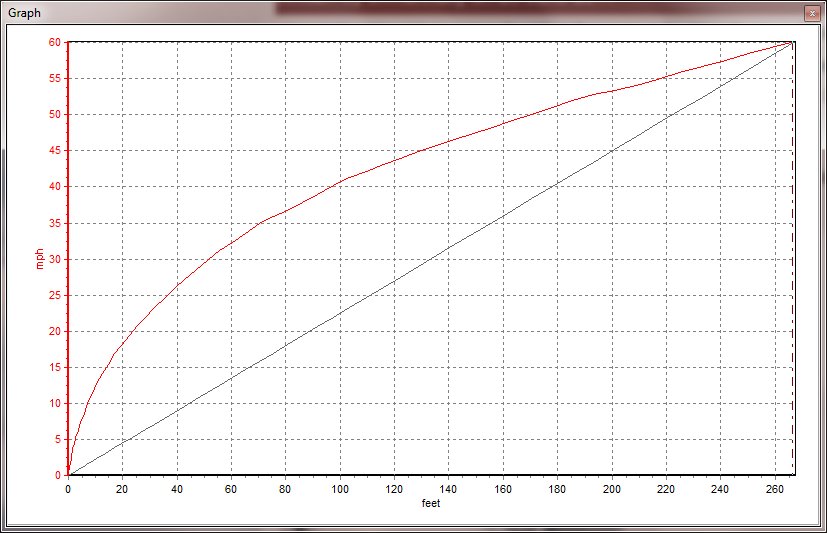
MPH vs Distance shows challenge getting off the line


Accel results
Speed(mph)     Time(s)
0-60                   05.4

With 1 ft roll-out details:

Speed(mph) Time(s) Dist(f)
0 0.00 0
10 0.71 7.13
20 1.45 23.53
30 2.23 51.94
40 3.09 96.6
50 4.21 170.2
60 5.39 265.8

Roll-out is a determination for ‘when’ the test time begins.  At a drag strip, there is up to 1 foot of roll-out before the timing lights are tripped, hence the term.  In other words, due to surface quality and wheel-spin it took me 0.59 sec to get 1 foot forward, but at the track that time would not have been included in the results and is not included above.

Weather Conditions: 87F; barometric pressure 29.69 in; humidity 64%.  Fuel: Full

Not sparkling time for the Cadillac STS-V, which Cadillac measured at 4.9 sec 0-60 mph with roll-out.  Most magazine tests ran high 4.x to low 5.x sec.  Road & Track measured 4.7 sec 0-60 mph for the STS-V.

I feel the 2008 STS-V is capable of a better time.  Getting the STS-V off the line involves a great threat of wheel-spin to be avoided.  Of course, my test area is not a sticky well prepared launch spot like at the drag-strip, but it does closely model real world circumstances.

On the bright side, this is a new ‘best’ for my personal vehicle measurements; my previous best was 0-60 in 5.95 sec in my modified CTS 3.6L and was measured on the AP-22 meter in more favorable circumstances.

Stock
STS-V


Mod CTS 3.6L
Speed (mph) Time(s) Dist(f) Time(s) Dist(f)
10 0.71 7.13 0.68 4
20 1.45 23.53 1.40 21
30 2.23 51.94 2.33 55
40 3.09 96.6 3.31 105
50 4.21 170.2 4.55 187
60 5.39 265.8 5.95 301

A line by line comparison — albeit of apples and oranges since different days, different gadgets — echoes the same issue — get the STS-V off the line faster and it would have much better times, and at 60 mph is 35 feet ahead of the CTS.